Works with the Insta360 X5

Blur faces & plates in your Insta360 X5 360° photos — automatically.

Privacy Keeper anonymizes your Insta360 X5 360° photos — faces and plates blurred across the full equirectangular frame, seam-aware and offline, with every EXIF and GPS field preserved for your tour and mapping workflows.

7-day free trial No credit card Works with Insta360 X5
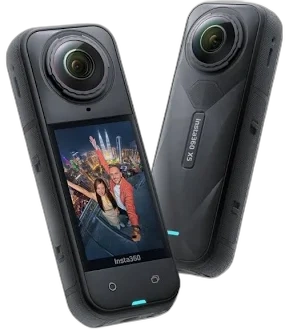
Insta360 X5 360° camera
72MP
360° photo capture
8K
Video frames too
100%
Offline · zero cloud
360°
Seam-aware detection

Small, distant faces are a detection challenge. We handle them.

In a handheld 360° photo, faces and plates can be tiny, far away, or stretched across the seam. Privacy Keeper’s multi-scale detection catches them anyway.

Multi-scale detection

Patch extraction finds faces and plates at any size or position across the full frame — not just the large, obvious ones.

Seam-aware at 0° / 360°

The equirectangular seam is where most tools split or miss objects. Detection wraps around the boundary so nothing slips through.

Multi-vehicle mask profiles

Shoot from poles, vehicles or backpacks? Save a mask profile per rig — mount point, selfie-stick, branding — and switch in one click.

EXIF & GPS preserved

Every metadata field is copied byte-for-byte — and editable — so your mapping and Street View pipelines keep working.

Faces & plates, automatically redacted

Output from production 360° captures — hover to see what the detector caught.

License plate automatically blurred
Face automatically blurred

From X5 capture to compliant deliverable

Load

Point Privacy Keeper at a folder of X5 360° photos and apply your saved mask & watermark profile.

Process & review

The GPU batch runs in seconds per frame. Review detections at full resolution; fix anything by hand if needed.

Export

Anonymised panoramas export with EXIF, GPS & camera metadata intact. Originals stay untouched; an audit log is written.

Try it on your own Insta360 X5 photos →

Insta360 throughput

Camera / FormatResolutionGPU TimeCPU Time
Insta360 X4 (reference)8,192 × 4,096 px~4.3 s~15 s

Measured on an NVIDIA RTX 3090 and AMD Ryzen 9 7950X3D. Scales across GPUs from 4 GB to 24 GB VRAM; automatic CPU fallback when no GPU is present.

Common questions

Yes. Export your X5 360° photos as equirectangular JPGs and Privacy Keeper processes them at full resolution — and any equirectangular image up to 32K — without downscaling.
Every EXIF field — GPS, heading, camera make/model, timestamps — is copied byte-for-byte to the anonymised output, so your mapping and Street View pipelines keep working unchanged.
Yes. Save a mask profile per vehicle and a full workflow (mask + watermark + EXIF rules), then reload it on the Process page in one click — or apply the same workflow JSON across thousands of panoramas via the CLI.

Anonymize your next Insta360 X5 shoot in minutes

Download Privacy Keeper and run it on your own X5 360° photos today. 7-day free trial, no credit card, every feature unlocked.

Rolling this out across a tour or capture business? Book a demo →

Try Privacy Keeper free on your Insta360 X5 photos Full features · no credit card · Windows 10/11